AI TOOLS
AI Tools for Freelancers and Agencies: The Stack That Pays for Itself
�� June 30, 2026 | ✍️ Brandrums Team | ⏱️ 11 min read
For freelancers and agencies, time is the product, so the math on AI tools is brutally simple and usually favorable. This guide lays out the best AI tools for freelancers and agencies in 2026: the stack, the costs, and how to keep it lean, so it pays for itself in under an hour of saved time a week. When you want to turn AI into a client offering, Brandrums can build it.
SEO Metadata Focus Keyphrase: AI tools for freelancers and agencies Meta Title: AI Tools for Freelancers and Agencies 2026 | Brandrums Meta Description: The best AI tools for freelancers and agencies in 2026. A complete stack for writing, design, and client work that pays for itself in under an hour of saved time a week. Slug / URL: /blog/ai-tools-for-freelancers-and-agencies Secondary Keywords: best AI tools for freelancers, AI for agencies, freelancer AI stack, AI tools for content, AI for marketing agencies Category: AI Tools Reading Time: 11 min read Word Count: ~2,650 words Published: June 30, 2026 Canonical URL: https://www.brandrums.com/blog/ai-tools-for-freelancers-and-agencies/ |
Why AI Pays Off Fast for Freelancers
Freelancers and agencies have a different relationship with AI than most businesses. For you, time is literally the product. Every hour you claw back is either an hour you can bill on something else or an hour you get to keep for yourself. That makes the math on AI tools brutally simple, and usually very favorable.
Here is the thing the data backs up: a freelancer billing $50 an hour recoups a $40-a-month AI toolkit with about 48 minutes of saved time per week. Forty-eight minutes. Most of these tools save you that before lunch on Monday.
The math on AI tools for freelancers is rarely close.
So the real question is not whether to use AI. It is which tools, for what, without drowning in subscriptions you forget you are paying for. Let us build the stack the smart way.
The Foundation: One Good AI Assistant
Start here, full stop. A general assistant like ChatGPT or Claude at around $20 a month is the single highest-leverage tool in the entire kit. It drafts, edits, brainstorms, summarizes, researches, and reformats. For agencies, ChatGPT tends to be the workhorse for marketing and content. Claude is the one people reach for on long-document work and nuanced writing.
If you do nothing else from this guide, get genuinely fluent with one of these. It is the difference between AI being a party trick and AI being the assistant you cannot remember working without. Spend a week using it for everything, and you will feel the shift.
The fluency point is the one that separates freelancers who get huge value from AI and those who shrug it off after a week. The tool rewards practice. The first few days you will write clumsy requests and get mediocre results, conclude it is overhated or overhyped, and nearly give up. Push through that. By the end of a week of using it for real work, drafting proposals, untangling client briefs, rewriting your own rough paragraphs, you develop an instinct for how to ask, and the quality of what comes back jumps dramatically. That instinct is the actual asset, not the subscription. Once you have it, the same $20 tool that felt underwhelming on day one becomes the thing you reach for a dozen times a day.
Mini case study: a solo brand designer added a single $20 assistant for the unglamorous parts of the job: proposals, client update emails, and turning messy discovery-call notes into clean creative briefs. She estimated it saved about five hours a week, roughly $1,800 a month of recovered time at her $90 rate, against a $20 cost. She reinvested those hours into one extra client. The tool never touched her actual design work; it cleared the admin crowding it out. |
For Writers and Content People
Beyond the core assistant, a couple of additions earn their spot in a writer's stack.
• An editing tool like Grammarly at around $12 a month to catch what you miss when you are reading your own work for the fifth time and your eyes have glazed over.
• A research tool like Perplexity Pro at roughly $17 a month if you fact-check constantly and want sources attached to every answer.
The combination of one assistant plus one editor covers the entire writing pipeline for most freelancers, from blank page to polished, client-ready draft. That is a complete content operation for around $32 a month.
For Designers and Creatives
Creative freelancers and agencies lean on a different cluster of tools. Canva Pro at $13 to $15 a month for fast, on-brand design. AI image and video tools for concepting and generating assets. This is actually where agencies pull ahead of everyone else, since they adopt creative AI tools harder than any other sector and use them to produce more work in less time without sacrificing quality.
For the Agency Itself: Client and Ops Work
If you run an agency, the assistant is just the start. The bigger gains come from the unglamorous operational stuff that quietly eats your team's billable hours.
• A meeting transcriber like Otter at around $8 a month so nobody is frantically scribbling notes during client calls instead of listening.
• An AI-enhanced CRM to keep leads and client communications organized without manual data entry.
• Automation tools to connect your apps so information stops getting copied by hand between systems.
An agency that automates reporting and admin frees its actual humans to do the creative and strategic work clients pay premium rates for. That is the whole business model, sharpened. When your team spends less time on status reports and more time on the work that wins awards and renewals, your margins improve without raising a single rate.
A day in an AI-assisted agency workflow
No single step is dramatic. Together they let the same team carry far more work.
Walk through a single client project with the stack running. The kickoff call is transcribed into a summary with action items. The assistant turns those notes into a structured brief in minutes, which a human sharpens. Writers draft and polish; designers concept faster and finish in Canva. The assistant drafts client update emails. An automation pulls the numbers into a report instead of someone rebuilding it by hand. No single step is dramatic. Added together across every project, they are the difference between an agency that comfortably handles six clients and one that handles ten with the same headcount.
The Complete Stack, Costed Out
A complete freelance or agency operation for the price of a couple of dinners out.
Tool | Role | Monthly cost |
ChatGPT or Claude | Core assistant: writing, research, ideas | $20 |
Grammarly | Editing and proofreading | ~$12 |
Canva Pro | Design and visuals | $13-$15 |
Meeting transcription | ~$8 | |
Perplexity Pro (optional) | Sourced research | ~$17 |
Total | Full freelance/agency operation | $40-$100 |
The Smart Move: Stack Free Tiers, Pay for One or Two
You do not need to subscribe to everything. The savviest freelancers in 2026 combine one paid subscription with several free tiers rather than paying for ten tools. Free ChatGPT, free Claude, free CRM, free research up to a limit. Pay for the one or two tools you live inside all day, and let the free tiers cover the rest.
There is even a bundle trick worth knowing: some services bundle multiple AI models into one subscription for around $30 a month total, which is far cheaper than paying $20 each for several assistants separately. If you genuinely want access to more than one model, a bundle beats stacking individual subscriptions.
Why would a freelancer want more than one model in the first place? Because they have different strengths, and once you are fluent you start to notice them. One tends to write cleaner long-form prose, another is sharper at quick research or structured tasks, a third has a tone you prefer for client-facing copy. You do not need this on day one, and most freelancers do their best work by mastering a single assistant first. But if you reach the point where you are reaching for different tools for different jobs, a bundle is the cost-efficient way to keep them all on hand without your subscription total quietly creeping toward $80 a month for capability you use in scattered bursts.
Turn AI Into a Client Offering Building deliverables on AI and want them to look like more than templated output? Brandrums builds AI solutions and automation agencies can use internally or fold into client work. |
Do Not Become a Subscription Hoarder
The flip side of all this is real, and it bites a lot of freelancers. It is easy to sign up for five AI tools in a quarter, actually use two of them, and quietly bleed $200 a month. If you log into a tool and most of its features are untouched, downgrade or cancel. You can always upgrade when you actually need the advanced stuff.
Keep your stack honest ✓ Every tool maps to a real, repeated task ✓ You actually open it most weeks ✓ You are not paying for features you never configured ✓ You review the whole stack every quarter ✓ You cancel anything you cannot tie to saved time or revenue |
The discipline is simple: pay for what you use, not what you intended to use. Every tool in your stack should map to a real, repeated task. If it does not, it is a leak, not a tool.
When Agencies Should Bring In a Partner
There is a ceiling on what off-the-shelf tools do. When an agency wants custom client solutions, AI-powered features baked into the work you deliver, or automation that connects systems no single tool talks to, that is build territory. It is also a way to offer clients something your competitors simply cannot, which is exactly the kind of differentiation that justifies higher rates.
That is where partnering up makes more sense than fighting integrations solo at midnight. Bringing in a team that builds this for a living means you ship something polished instead of something held together with duct tape.
Build Your Stack This Week One assistant, one editor or design tool, one transcriber. Get fluent, then expand where you feel a pinch. When you are ready to turn AI into a client offering, Brandrums can build it with you. |
Frequently Asked Questions
Frequently Asked Questions
What AI tools should freelancers use in 2026?
Start with one general AI assistant like ChatGPT or Claude at around $20 a month for writing, research, and brainstorming. Add a $12 editing tool like Grammarly, a $17 research tool like Perplexity Pro if you fact-check often, and Canva Pro at $13 to $15 for design. A full freelancer stack runs about $40 to $100 a month total.
Is AI worth it for freelancers?
Yes. A freelancer billing $50 an hour recoups a $40 a month AI toolkit with about 48 minutes of saved time per week. Most assistants save that before lunch on Monday. Professionals who save just two to three billable hours a month break even on a $40 toolkit.
How do agencies use AI?
Agencies use AI for content creation, design, meeting transcription, CRM management, and automation. Agency and tech teams average 8 to 12 hours of AI tool usage per week, the highest of any sector. The biggest gains come from automating reporting and admin so human staff can focus on creative and strategic work.
How much should a freelancer spend on AI tools?
About $40 to $100 a month for a complete functional stack. The smartest approach is to combine one or two paid subscriptions with several free tiers rather than paying for every tool. Pay for the tools you live inside all day and let free tiers cover the rest.
Can AI replace a freelancer's skills?
No. AI speeds up the repetitive parts of creative and knowledge work, but it does not replace judgment, taste, client relationships, or strategy. The freelancers who win treat AI as leverage on their existing skills, producing more and faster, not as a substitute for the expertise clients pay for.
About Brandrums Brandrums is a digital agency helping businesses grow with web design, app development, SEO, branding, and practical AI solutions. We build AI setups around real goals and real budgets, so you get tools and automation that actually earn their keep. Explore our AI solutions or talk to our team to get started. |
© 2026 Brandrums. All rights reserved. | brandrums.com
AI TRENDS
Industries Investing the Most in AI in 2026 (Data by Sector)
�� June 30, 2026 | ✍️ Brandrums Team | ⏱️ 11 min read
AI adoption is not uniform. Some industries have built it into their core; others are still circling it. This guide shows the industries investing the most in AI in 2026, sector by sector, with the spending and adoption data, and a clear read on what each trend means for you. When you want to act on it, Brandrums can help.
SEO Metadata Focus Keyphrase: industries investing the most in AI Meta Title: Industries Investing the Most in AI in 2026 | Brandrums Meta Description: Which industries invest the most in AI in 2026? Sector-by-sector spending and adoption data for finance, tech, healthcare, retail, and more, plus what it means for you. Slug / URL: /blog/industries-investing-most-in-ai Secondary Keywords: AI by industry, AI adoption by sector, AI spending 2026, AI in finance, AI in healthcare, AI in retail Category: AI Trends Reading Time: 11 min read Word Count: ~2,600 words Published: June 30, 2026 Canonical URL: https://www.brandrums.com/blog/industries-investing-most-in-ai/ |
The Headline Numbers
AI adoption is nowhere close to uniform. Some industries have woven it into the core of how they operate. Others are still poking at it from a cautious distance. And the gap between those two groups is widening every quarter. If you want to know whether your business is ahead, behind, or right on pace, it helps to see where the money is actually flowing.
Start with the big picture. Global enterprise AI spending reached roughly $186 billion in 2026, up about 47 percent from the year before. Across the board, 86 percent of organizations say their AI budget is increasing this year, another 12 percent say it is holding steady, and nearly 40 percent expect increases of 10 percent or more.

Adoption varies widely by sector, and the gap is where opportunity lives.
This is not a sector deciding whether to invest. It is most of the economy deciding how much. One more anchor stat: 88 percent of organizations now report using AI in at least one business function, up from 78 percent a year earlier. AI crossed the mainstream threshold a while ago. The live question now is depth, not whether.
Financial Services: The Biggest Spender
Finance leads in raw dollars, with AI spending around $38.2 billion, the largest share of any sector. It is easy to see why. Banks and investment firms run on text, numbers, documents, and analysis, which is exactly what AI is built to chew through at scale.
The use cases are everywhere: fraud detection, risk modeling, algorithmic trading, and customer personalization. Fraud detection alone sees adoption near 89 percent among AI-using finance firms. When milliseconds and pattern recognition translate directly into money, the investment case writes itself. Investment firms have been especially aggressive, using AI to spot patterns human analysts simply cannot see fast enough.
Sector snapshot: a mid-sized bank deploying AI fraud detection can flag suspicious transactions in real time across millions of accounts, catching patterns a human team would need days to surface. The return is measured in fraud losses prevented, which is why finance tolerates higher per-project costs than almost any other sector. |
There is a second reason finance leads on spending: the cost of being wrong is enormous, so the willingness to invest in getting it right is correspondingly high. A retailer with a slightly off recommendation loses a marginal sale. A bank with a slightly off risk model loses real money and possibly regulatory standing. That asymmetry pushes financial firms to fund AI heavily and to demand robust, well-tested systems rather than quick experiments. It also means finance was an early and demanding customer for enterprise AI, which helped mature the whole category for everyone else.
Technology and SaaS: The Highest Adoption Rate
If finance spends the most, tech adopts the most. Around 92 percent of technology companies use AI in some form, and the sector pours the highest share of its IT budget into it, north of 18 percent.
Inside software companies, AI now writes a large chunk of code, and a strong majority of developers use AI coding assistants daily. Tech also builds AI directly into the products it sells, so the investment compounds. They use it internally to move faster and ship it externally as a feature. That double benefit is why the sector keeps pulling ahead.
This compounding is worth dwelling on, because it explains why the gap between tech and everyone else keeps widening rather than closing. When a software company gets better at using AI internally, it ships products faster. When those products have AI features, the company learns even more about what works. Each cycle feeds the next. Other industries adopt AI to improve operations, which is valuable, but technology companies adopt it to improve the very thing they sell, which creates a flywheel. For businesses outside tech, the practical lesson is not to try to match that flywheel but to borrow its output: the accessible, battle-tested tools that tech companies built and now sell to everyone else at $20 a month.
Healthcare: The Fastest Accelerator
Healthcare is the comeback story of the year. Adoption jumped from around 38 percent in 2024 to roughly 67 percent in 2026, one of the sharpest climbs of any industry. The growth is fueled by regulatory clarity, a wave of FDA-cleared AI medical devices, and hard evidence that AI-assisted diagnostics reduce error rates.

Healthcare adoption nearly doubled in two years, one of the sharpest climbs anywhere.
The applications are serious and high-stakes: reading medical images, supporting clinical decisions, and handling the mountain of documentation that burns out clinical staff. Healthcare spends more per project than most sectors because compliance and security are non-negotiable, but the trajectory is pointed straight up.
The documentation angle deserves a mention because it is where the near-term savings concentrate. Clinicians spend a staggering share of their time on paperwork rather than patients, and that administrative load is a leading driver of burnout. AI that drafts clinical notes, summarizes patient histories, and handles routine documentation gives that time back to care. It is less headline-grabbing than an AI reading a scan, but it is often where hospitals see the fastest, clearest return, because it attacks a cost and a staffing problem at the same time. That combination of obvious need and measurable payback is a big part of why healthcare adoption nearly doubled in just two years.
Retail and E-Commerce: AI Across the Whole Journey
Retail sits around 77 percent adoption and has spread AI across the entire customer journey, from product discovery to post-purchase support. Direct contact with millions of customers generates exactly the kind of data that AI feeds on.
The wins are concrete and measurable. AI product recommendations lift average order values by 10 to 30 percent. Demand forecasting cuts both stockouts and overstock. Chatbots handle the bulk of routine questions. Retailers using generative AI report strong returns, and the top performers see outsized payback per dollar invested.
Sector snapshot: an online retailer that adds AI-driven product recommendations to its checkout flow can lift average order value by double digits without spending a cent more on traffic. Stack that with demand forecasting that trims wasted inventory, and the margin improvement compounds across the whole operation. |
Professional Services and Agencies: The Highest Spend Per Head
Here is a number that surprises people. Professional and business services spend the most per employee on AI, around $3,470 a head, ahead of even technology companies at roughly $2,800.
Professional services spend the most per head, ahead of even tech.
Agencies and consultancies live on cognitive, analytical work, which is precisely where AI delivers, and it shows in usage intensity. Agency and tech teams average 8 to 12 hours a week inside AI tools, while slower-moving sectors like finance sit at 3 to 5 hours, often held back by compliance friction rather than lack of interest.
Manufacturing and the Sectors With the Most Room to Grow
Not every industry is racing ahead, and that is its own kind of opportunity. Manufacturing sits around 52 percent adoption, well behind the leaders, despite obvious use cases in predictive maintenance, quality control, and supply chain forecasting. The barriers are real: legacy equipment, heavy upfront integration, and workforces that need retraining. But the upside is large precisely because so few competitors have moved.
The same logic applies to construction, agriculture, and parts of logistics. These sectors trail on adoption, which means the businesses inside them that move now are not fighting for a marginal edge. They are stepping into clear space while their competitors hesitate. Trailing-sector adoption is arguably one of the highest-leverage AI moves available in 2026, because you capture an advantage before it becomes table stakes.
The Full Picture at a Glance
Industry | Approx. adoption | Standout metric |
Technology / SaaS | ~92% | Highest IT budget share to AI (18%+) |
Financial services | ~84% | Largest raw spend (~$38.2B) |
Retail / e-commerce | ~77% | 10-30% lift in average order value |
Healthcare | ~67% | Fastest growth (+29 points since 2024) |
Professional services | High | Most spend per employee (~$3,470) |
Manufacturing | ~52% | Trailing, big upside remaining |
What This Means for Your Business
The data is interesting on its own, but the point is what you do with it. A few honest takeaways depending on where you sit.
• If you are in a leading sector (finance, tech, retail, professional services), your competitors are already using AI. Standing still is quietly falling behind. The question is how fast you can close the gap, not whether you need to.
• If you are in a slower-moving sector (manufacturing, agriculture, and others trailing the pack), you have a genuine window. Adopting now puts you ahead of your direct competitors instead of scrambling to catch up in two years.
• Either way, the budget trend is the tell. When 86 percent of organizations are increasing AI spend at once, the safe-looking choice of waiting is the actual risk.
The good news is you do not need a finance-sized budget to compete. The same accessible tools that let a tiny e-commerce shop go up against a corporation are available to you right now, today. What matters is applying them to the right parts of your business, which is exactly where most of the value is won or lost.
Where Does Your Industry Stand? Brandrums helps businesses across industries figure out which AI moves actually move the needle for their specific situation. |
Frequently Asked Questions
Frequently Asked Questions
Which industry invests the most in AI?
Financial services leads in raw AI spending at around $38.2 billion in 2026, the largest share of any sector, driven by fraud detection, risk modeling, algorithmic trading, and customer personalization. Technology has the highest adoption rate at about 92 percent, and professional services spend the most per employee at around $3,470 per head.
How much are companies spending on AI in 2026?
Global enterprise AI spending reached roughly $186 billion in 2026, up about 47 percent from the prior year. Across all sectors, 86 percent of organizations say their AI budget is increasing this year, and nearly 40 percent expect increases of 10 percent or more.
Which industry is adopting AI the fastest?
Healthcare is the fastest accelerator, jumping from around 38 percent adoption in 2024 to roughly 67 percent in 2026. The growth is driven by regulatory clarity, a wave of FDA-cleared AI medical devices, and evidence that AI-assisted diagnostics reduce error rates.
What does AI investment by industry mean for small businesses?
If you are in a leading sector, your competitors already use AI and standing still means falling behind. If you are in a slower sector, you have a window to adopt now and get ahead of direct competitors. Either way, the broad budget increase signals that waiting is the riskier choice.
Do I need a big budget to compete on AI?
No. The same accessible, low-cost tools that large companies use are available to small businesses. What matters is applying them to the right parts of your business, not how much you spend. Smaller players regularly level the playing field with the same off-the-shelf AI tools enterprises use.
About Brandrums Brandrums is a digital agency helping businesses grow with web design, app development, SEO, branding, and practical AI solutions. We build AI setups around real goals and real budgets, so you get tools and automation that actually earn their keep. Explore our AI solutions or talk to our team to get started. |
© 2026 Brandrums. All rights reserved. | brandrums.com
AI FOR BUSINESS
AI Cost Breakdown for Startups: Where Every Dollar Goes
�� June 30, 2026 | ✍️ Brandrums Team | ⏱️ 12 min read
Startups watch every week of runway, so "should we invest in AI" is really "where does the money go and does it come back." This AI cost breakdown for startups lays out the three spending tiers for 2026, the hidden costs, and an ROI playbook that keeps you lean. When you want the build-versus-buy call made with you, Brandrums can help.
SEO Metadata Focus Keyphrase: AI cost breakdown for startups Meta Title: AI Cost Breakdown for Startups 2026 | Brandrums Meta Description: A real AI cost breakdown for startups in 2026. The three spending tiers, exact numbers, hidden costs, and a playbook to get ROI without burning runway. Slug / URL: /blog/ai-cost-breakdown-for-startups Secondary Keywords: startup AI cost, AI for startups, how much does AI cost, AI budget for startups, custom AI cost Category: AI for Business Reading Time: 12 min read Word Count: ~2,780 words Published: June 30, 2026 Canonical URL: https://www.brandrums.com/blog/ai-cost-breakdown-for-startups/ |
The Good News, First
Startups have a specific AI problem. You are not a hobbyist who can mess around for free with no consequences, and you are not an enterprise with a comfortable budget line labeled "AI initiatives." You are somewhere in the middle, watching runway, trying to figure out whether AI is a smart bet or a money pit dressed up as innovation.
So let us break down exactly where the money goes, what each tier buys you, and where startups consistently overspend. Real numbers, current for 2026, no vendor spin.
This is the cheapest year in history to start with AI, and that is not a marketing line. Average AI software prices have actually dropped around 15 percent since 2024, driven by fierce competition among providers all fighting for your subscription. Free tiers are genuinely capable. Tools that used to cost a fortune to access now sit at $20 a month.
The number to remember: for most startups, you can launch meaningful AI for under $5,000, or $20 to $100 per user per month using off-the-shelf tools instead of building anything custom. Every time a vendor pitches a bigger, more complex solution, this is your reality check. |
Tier 1: The Lean Startup Stack ($50 to $500 a Month)
This is where almost every startup should live at the beginning, and many should stay longer than they think.

Start at Tier 1. Let proven returns, not FOMO, pull you up the tiers.
At this tier you are subscribing to tools that plug into work you already do. A general AI assistant at $20. A writing or content tool. A meeting transcriber. Maybe a design tool and an AI-enhanced CRM feature. Stack a few of these and you land in the $50 to $500 range depending on how many seats and features you need.
What you get back is the entire point. Businesses using AI tools report average productivity gains of 25 to 40 percent, with most well-chosen tools paying for themselves in under a year. For a startup counting every week of runway, "pays for itself in months" is a rare and beautiful sentence.
Need | Tool type | Monthly cost |
Writing, research, analysis | AI assistant (ChatGPT, Claude) | $20 |
Content and marketing | Content tool or assistant | $0-$50 |
Meeting notes | Transcriber (Otter) | ~$8 |
Design | Canva Pro | $13-$15 |
Sales and contacts | AI-enhanced CRM | $0-$100 |
Mini case study: a three-person SaaS startup ran its entire first year on Tier 1. One $20 assistant for drafting docs and support replies, a free CRM, and Canva Pro. Total AI spend stayed under $40 a month. They credited the assistant alone with saving their founder roughly six hours a week on customer emails and investor updates, and did not spend on automation or custom builds until they had real revenue and a real bottleneck. |
What that startup understood, and what many miss, is that Tier 1 is not a stepping stone to be rushed through. For a lot of early-stage companies it is the destination for the entire first year, sometimes longer. The pressure to "do something more serious with AI" usually comes from outside, from competitors' marketing or investor conversations, not from an actual bottleneck in the business. Until you hit a wall that off-the-shelf tools genuinely cannot handle, staying at Tier 1 is not falling behind. It is the disciplined choice that keeps your burn low while you figure out what your business actually needs.
Tier 2: Workflow Automation ($2,000 to $8,000 a Month)
You hit this tier when AI stops merely helping with tasks and starts replacing whole manual processes. Automated reporting pipelines. Document processing. Customer communication that triggers off behavior instead of someone remembering to send it.
The tool costs go up, but the bigger expense here is implementation. Someone has to map your current workflow, find the automation points, wire the tools together, and test everything before it goes live. Plan for $5,000 to $15,000 in one-time setup per major workflow on top of the monthly tooling cost.
The payoff scales too. An automated reporting workflow that saves your operations lead 15 hours a week does not just save time. It gives you decision speed you did not have before, which is exactly the kind of edge that matters when you are small and trying to outmaneuver bigger competitors. That ROI is real, even though it is hard to fit on a vendor's pricing page.
The signal that you are genuinely ready for Tier 2 is specific: you have a process that is both repetitive and clearly defined, it is consuming real hours every week, and you have already proven with Tier 1 tools that AI handles the individual pieces well. When all three are true, automating the whole workflow is a sound investment. When they are not, Tier 2 spending tends to produce expensive, fragile automations that break the moment your process changes. The setup cost is the part to respect here. Paying $10,000 to wire up a workflow you are still figuring out is how startups end up rebuilding the same automation twice. Nail the process manually first, then automate the version you know works.
Tier 3: Custom AI ($8,000 to $20,000+ a Month, or a Project Fee)
This is building something specific to you: a model trained on your data, a proprietary recommendation engine, an AI feature baked into your own product. Agency custom builds typically run $10,000 to $50,000 as a one-time project, and ongoing custom operations can run $8,000 to $20,000+ a month once you factor in maintenance.
Here is the honest advice most startups need to hear. Do not jump to Tier 3 before you have squeezed everything possible out of Tiers 1 and 2. The startups that build custom AI too early almost always regret it, because custom means you are now in the software maintenance business whether you wanted to be or not. Models need retraining. Data pipelines need monitoring. It is real, ongoing work that pulls focus from your actual product.
Rule of thumb: most companies in the small-to-mid range exhaust pre-built tools before investing in custom models. The ones that jump to custom first usually overspend and underdeliver. |
The Hidden Costs That Wreck Startup Budgets
The sticker price is never the whole price. Here are the costs that quietly drain runway if you do not plan for them.
• Setup and training time. The advertised monthly fee is often only 20 to 40 percent of your true first-year cost once you add setup, training, and the productivity dip while your team adapts.
• Integration. Connecting AI tools to your existing systems can run $500 to $5,000.
• Usage-based billing. Tools that charge per API call or token get more expensive as you grow. Wonderful for the vendor, surprising for you.
• In-house hires. An AI specialist costs $80,000 to $180,000 a year plus overhead, which is exactly why agency pilots at $5,000 to $20,000 are a lower-risk way to test the water.
• Data cleanup. Your AI is only as good as the data behind it, and a messy early-stage CRM produces messy results.
What "true cost" actually looks like
Take a tool advertised at $50 a month. On paper that is $600 for the year. Now add the real first-year extras: roughly 25 hours of setup and learning, a $1,500 integration to connect it to your existing systems, and a couple of weeks of slightly reduced output while the team adapts. Suddenly your $600 tool has a true first-year cost closer to $3,000 to $4,000.
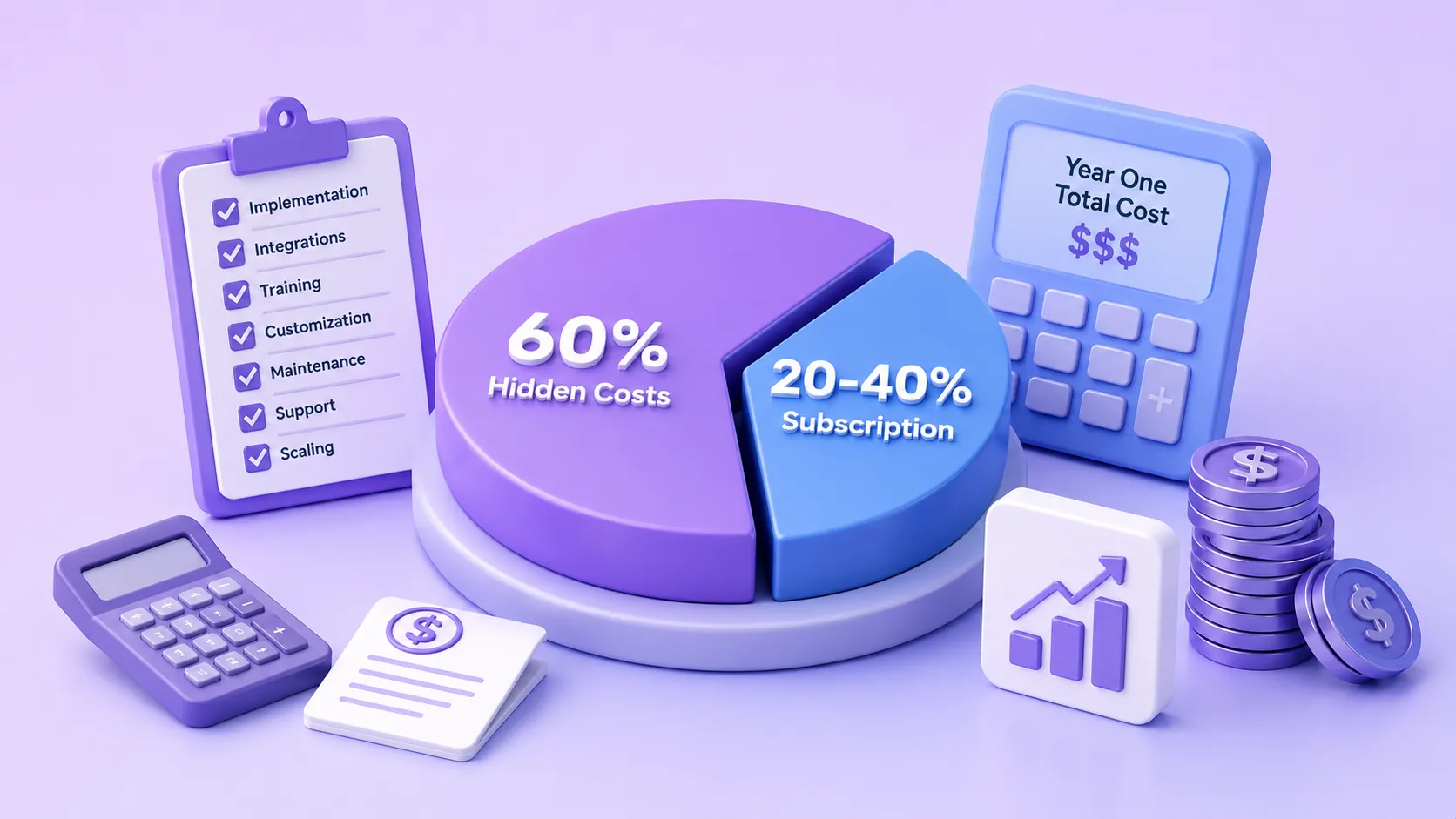
The subscription is often just 20 to 40 percent of what the tool really costs in year one.
This is not a reason to avoid the tool. It is a reason to budget honestly so the cost does not ambush you in month two. Startups that plan for the full number make calm decisions. The ones that only see the sticker price end up scrambling.
Build or Buy? Get It Right the First Time. The build-versus-buy decision is where most startup AI budgets are won or lost. Brandrums helps startups choose so you do not overpay for capability you are not ready to use. |
A Sample First-Year Startup AI Budget
To make the tiers concrete, here is how a typical seed-stage startup might spend across its first year, growing only as each phase proves out.
Spend almost nothing while learning. Add capability only after proving you need it.
Stage | What you are doing | Monthly spend |
Months 1-3 | Free tiers plus one $20 assistant; finding real needs | $20-$60 |
Months 4-7 | Full Tier 1 stack across the small team | $100-$300 |
Months 8-10 | First workflow automation (one process) | $300-$800 + setup |
Months 11-12 | Optimize, cut idle tools, scale what works | $300-$1,000 |
The shape matters more than the exact figures. You spend almost nothing while you are still learning, you add capability only after proving you need it, and you reach a justified, productive spend by year-end instead of a pile of subscriptions you cannot account for. A startup that inverts this, buying big in month one, almost always burns cash it cannot get back.
The Startup AI Playbook
If I had to compress this entire breakdown into one approach, it is this.
Spend efficiently, learn fast ✓ Start at Tier 1. Prove ROI on a single, specific use case before spending more. ✓ Pilot before you scale. Run one tool with one team, measure the result, then expand. ✓ Measure outcomes, not vibes. Track hours saved or revenue added, not how impressive the tool feels. ✓ Audit quarterly. Cut anything sitting idle. Idle subscriptions are pure runway leak. ✓ Move up tiers only when the numbers demand it. Let proven returns, not FOMO, pull you forward. |
Follow that and you will spend efficiently, learn fast, and avoid the expensive trap of building big before you know what works. Organizations that pilot, measure, and scale deliberately typically achieve 3 to 5 times ROI on their AI investments within 12 to 18 months. The ones that spray money at every shiny tool do not.
Map Your AI Spend to Your Runway If you would rather not figure out the build-versus-buy math alone while running a company, Brandrums maps AI investments to your stage and your runway. |
Frequently Asked Questions
Frequently Asked Questions
How much does AI cost for a startup in 2026?
Most startups can launch meaningful AI for under $5,000, or $20 to $100 per user per month using off-the-shelf tools. AI spending falls into three tiers: tool adoption ($50 to $500 per month), workflow automation ($2,000 to $8,000 per month plus setup), and custom AI ($8,000 to $20,000+ per month or a $10,000 to $50,000 one-time build).
Should a startup build custom AI or use existing tools?
Use existing tools first. Most startups should exhaust off-the-shelf tools before building custom, because custom AI puts you in the software maintenance business with retraining and monitoring costs. Build custom only when you have genuinely outgrown pre-built tools and have a specific need no product solves.
What is the ROI of AI for startups?
Businesses using AI tools report average productivity gains of 25 to 40 percent, with most well-chosen tools paying for themselves in under a year. Companies report an average 3.7x return for every dollar invested in generative AI, though returns concentrate among those deploying AI across multiple functions rather than in isolated pilots.
Is it cheaper to hire an AI specialist or use an agency?
For most startups, an agency is lower risk. An in-house AI specialist costs $80,000 to $180,000 a year plus overhead, while an agency pilot project runs $5,000 to $20,000. Agencies let you test AI capability without a full-time salary commitment before you scale.
What is the biggest AI budget mistake startups make?
Building custom AI too early. Jumping to a custom model before exhausting cheaper off-the-shelf tools means taking on maintenance costs and engineering distraction before you have even proven the use case. Start lean, prove ROI, then scale up only when the numbers justify it.
About Brandrums Brandrums is a digital agency helping businesses grow with web design, app development, SEO, branding, and practical AI solutions. We build AI setups around real goals and real budgets, so you get tools and automation that actually earn their keep. Explore our AI solutions or talk to our team to get started. |
© 2026 Brandrums. All rights reserved. | brandrums.com
AI FOR BUSINESS
How to Start Using AI in Business: A 2026 Beginner Guide
�� June 30, 2026 | ✍️ Brandrums Team | ⏱️ 12 min read
If "doing something with AI" has felt like it needs a data team and a big budget, relax. This beginner guide shows how to start using AI in business in 2026 step by step, with the exact tools, a prompt method, and a 30-day plan to get AI saving you real time this week. When you would rather have it set up for you, Brandrums can help.
SEO Metadata Focus Keyphrase: how to start using AI in business Meta Title: How to Start Using AI in Business: 2026 Beginner Guide | Brandrums Meta Description: A practical, no-hype beginner guide to using AI in business in 2026. Learn the exact steps, tools, and a 30-day plan to get AI saving you real time this week. Slug / URL: /blog/how-to-start-using-ai-in-business Secondary Keywords: AI for beginners, AI business guide, best AI tools for business, using AI in small business, AI prompts Category: AI for Business Reading Time: 12 min read Word Count: ~2,820 words Published: June 30, 2026 Canonical URL: https://www.brandrums.com/blog/how-to-start-using-ai-in-business/ |
Why Now Is the Easiest Time to Start
If you have been putting off "doing something with AI" because every article makes it sound like you need a data science team and a six-figure budget, here is some relief. You do not. In 2026, getting started is cheaper and simpler than it has ever been, and you can have something genuinely useful running before the end of this week.
A quick bit of context that should lower your blood pressure. AI adoption has already crossed into the mainstream. As of 2026, 88 percent of organizations report using AI in at least one business function, up from 78 percent a year earlier. Generative AI reached 53 percent population adoption within three years, faster than either the personal computer or the internet did.
88 percent of organizations now use AI in at least one function. You are arriving right on time.
What that means for you as a beginner: the tools have been battle-tested by millions of people, the rough edges are sanded down, and the price has collapsed. You are not an early adopter taking a risk. You are arriving at the moment when this stuff finally just works.
The payoff is not abstract. Small business employees save an average of 5.6 hours a week using AI tools, and managers reclaim over 7 hours. A majority of users report saving $500 to $2,000 a month once they have a tool or two running on the right tasks. |
Those numbers are not reserved for tech companies with engineering teams. They show up for the bakery owner who stopped writing every social caption by hand and the accountant who stopped summarizing client documents line by line.
Step 1: Pick One Annoying Task, Not a Strategy
The single biggest mistake beginners make is trying to "adopt AI" as a sweeping, company-wide initiative. That is how you end up with three subscriptions, a vague sense of guilt, and nothing to show for it.
Instead, pick one task. A single thing that eats your time and follows a pattern. For example:
• Writing the same kind of email over and over.
• Summarizing long documents or reports.
• Drafting social media posts.
• Answering the same five customer questions all day.
• Cleaning up messy meeting notes into something readable.
Pick the one that makes you sigh when it lands on your desk. That task is your entry point. Everything about AI gets easier when you are solving one real, concrete problem instead of chasing a buzzword. You will learn the tool faster because you have an actual goal, and you will know immediately whether it is working.
The reason this matters so much is that "adopt AI" is not a task your brain can act on, while "turn these messy call notes into a client recap" is. The first is a vague aspiration that produces browsing and second-guessing. The second is a concrete job you can hand to a tool this afternoon and judge by lunchtime. Beginners who start narrow build momentum, because each small win makes the next task obvious. Beginners who start broad stall, because there is no single thing to point the tool at. Narrow is not a limitation here. It is the fastest path to actually getting somewhere.
Mini case study: a small marketing consultancy started with the free tier of an AI assistant and one task, turning rough call notes into polished client recaps. That cut their post-meeting admin from about 40 minutes to 10. Over a month of calls, that was roughly 8 hours back. One task, one free tool, one measurable result. That is the shape of a successful start. |
Step 2: Start With a Free or Cheap Tool
You do not need anything fancy on day one. A general AI assistant like ChatGPT or Claude, on the free tier or the $20 plan, handles a shocking amount of small business work: writing, editing, brainstorming, research, simple data questions, and more.
Open it. Paste in your annoying task. Ask it to help. That is the entire setup. There is no installation marathon, no integration project, no IT ticket. The whole skill at this stage is just describing what you want clearly, which we will cover next.
If you are budget-conscious, stay on the free tier until you bump into its limits. The free versions cap how much you can use them and slow down at busy times, but for testing one task they are more than enough. Upgrade to the $20 plan only when the limits start interrupting real work.
Step 3: Learn to Write a Decent Prompt
A "prompt" is just the instruction you give the AI. This is the one skill that separates people who think AI is magic from people who think it is useless, and it takes about a day to learn.
Beginners type one vague line, get a generic answer, and conclude AI is overrated. The fix is simple: tell the AI three things.
1. Who it is for. "Write this for past customers who haven't bought in six months."
2. What you want. "A friendly email offering 15 percent off, around 120 words."
3. What good looks like. "Casual tone, one clear call to action, no corporate jargon."

Twenty extra seconds of specifics is the entire skill.
A worked before-and-after
Here is the difference in practice. A bad prompt: "write a product description for my candle." You get something generic that could describe any candle on earth. A good prompt: "Write a 60-word product description for a hand-poured lavender soy candle aimed at people who want to relax after work. Warm, calming tone. Mention the 40-hour burn time. End with a soft call to action." Now you get copy you can almost paste straight onto the product page.
The good prompt took maybe 20 extra seconds to write. That 20 seconds is the entire skill. And when the first answer is not quite right, do not start over. Just tell it what to change. "Make it shorter." "More formal." "Add a line about free shipping." That back-and-forth is how the real work gets done.
Step 4: Put a Chatbot on the Boring Questions
Once you are comfortable with an assistant, the next easy win for most businesses is customer support. Look at the questions you get all day. A huge share of them are the same handful repeated endlessly: your hours, your pricing, shipping, returns, how to book.
An AI chatbot can handle those around the clock so you and your team stop answering them by hand. In retail, chatbots already handle the majority of routine customer inquiries, and that frees up humans for the conversations that actually need a person, the ones where empathy or judgment matter. This is one of the highest-return first moves a small business can make, because it saves time every single day and improves response speed for your customers at the same time.
Want Help Setting Up Your First AI Workflow? Brandrums builds support and automation setups that fit how your business actually runs, so the first thing you try is also the thing that works. |
Step 5: Measure Whether It Is Actually Working
This is the step beginners skip, and it is the most important one in the whole guide. Before you call any tool a success, answer one question: what did it save me?
Track it loosely, but track it. How many hours did this give back this week? Did it bring in a lead, close a sale, or cut an error? If you can point to something real within 60 days, keep going and consider expanding. If you cannot, drop it and try a different task. The goal was never "use AI." The goal was to get time and money back. Keep that front and center and you will never waste money on a tool that looks impressive but does nothing for you.
Your Realistic First 30 Days
Here is what a sane on-ramp looks like, with no overwhelm and no wasted spend.
A low-pressure on-ramp: one task, one tool, measured before you scale.
Week | Focus | What you actually do |
Week 1 | Pick and test | Choose your one annoying task. Open a free AI assistant. Use it daily on that task. |
Week 2 | Get fluent | Practice prompting. Add one specialized tool if you have an obvious need, like writing help or meeting notes. |
Week 3 | Automate one thing | Set up a simple automation, like FAQ chatbot responses or auto-drafted social posts. |
Week 4 | Review and decide | Look at what you saved. Keep what worked, cut what did not, and choose your next task. |
That is it. Four weeks, almost no cost, and at the end you have proof of what AI does for your specific business. From there you scale into the bigger stuff with confidence instead of guesswork.
Five Beginner Mistakes to Skip
You can save yourself months by avoiding the errors almost every beginner makes.
Avoid these from day one ✓ Trying to automate everything at once. Pick one task, master it, then expand. ✓ Vague prompts. "Help me with marketing" gets you nothing useful. Specifics get you gold. ✓ Trusting output blindly. AI sometimes states wrong things confidently. Check facts and anything customer-facing. ✓ Paying too early. Free tiers are capable. Do not subscribe to six tools before you know which one you need. ✓ Skipping measurement. If you never check what a tool saved you, you will keep paying for ones that do nothing. |
None of these are hard to avoid. They are just the default path if you wander in without a plan. You now have the plan, so you can step around all five.
The Mindset That Makes This Work
One last thing, because it matters more than any tool. Treat AI like a capable new assistant, not a magic button. A new assistant needs clear instructions, a bit of correction, and a defined job. Give it those, and it produces. Expect it to read your mind, and it disappoints. Beginners who get this framing right move much faster, because they stop waiting for perfection and start iterating.
Ready to Start Without the Wasted Spend? Plenty of owners get the basics going themselves. If you would rather have someone set up a stack that fits your business from day one, that is what we do. |
Frequently Asked Questions
Frequently Asked Questions
How do I start using AI in my business as a beginner?
Start with one specific, repetitive task instead of trying to adopt AI company-wide. Pick something like drafting emails, summarizing documents, or answering common customer questions. Use a free or $20 AI assistant like ChatGPT or Claude on that single task, get good at writing clear prompts, then measure what it saved you before expanding.
What is the best AI tool for a business beginner?
A general AI assistant like ChatGPT or Claude is the best starting point. The free tiers are capable, and the $20 paid plans remove usage limits. One assistant handles writing, editing, research, and brainstorming, which covers most early small business needs before you add specialized tools.
Do I need technical skills to use AI in business?
No. Modern AI tools work through plain conversation. The main skill is writing a clear instruction, called a prompt, the same way you would brief a new assistant. Tell the AI who it is writing for, what you want, and what a good result looks like. You will be fluent within a few days of regular use.
How long does it take to see results from AI?
Most businesses see time savings in the first week. Small business employees save an average of 5.6 hours a week using AI tools. The key is to measure a specific outcome within 60 days, such as hours saved or leads handled, so you can tell whether a tool is worth keeping.
How much does it cost to start using AI?
You can start for free using the free tiers of major AI assistants. A paid starter stack of one assistant plus a couple of specialized tools runs about $40 to $60 a month. Most small businesses spend $50 to $500 a month once they grow into automation and customer support tools.
About Brandrums Brandrums is a digital agency helping businesses grow with web design, app development, SEO, branding, and practical AI solutions. We build AI setups around real goals and real budgets, so you get tools and automation that actually earn their keep. Explore our AI solutions or talk to our team to get started. |
© 2026 Brandrums. All rights reserved. | brandrums.com
AI FOR BUSINESS
AI Budget Examples for Small Businesses: Real 2026 Costs and Stacks
�� June 30, 2026 | ✍️ Brandrums Team | ⏱️ 12 min read
Most small business owners want a number before they touch AI, not a lecture about the future of work. This guide gives you that number, with real 2026 AI budget examples for small businesses, from free stacks to $500-a-month growth setups, plus the hidden costs and the ROI math. When you want the setup built for you, Brandrums can handle it.
SEO Metadata Focus Keyphrase: AI budget examples for small businesses Meta Title: AI Budget Examples for Small Businesses (2026) | Brandrums Meta Description: See real AI budget examples for small businesses in 2026, from $0 free stacks to $500/month growth setups. Exact tools, prices, ROI math, and hidden costs explained. Slug / URL: /blog/ai-budget-examples-small-businesses Secondary Keywords: small business AI cost, AI tools for small business, how much does AI cost, AI budget 2026, cheap AI tools Category: AI for Business Reading Time: 12 min read Word Count: ~2,850 words Published: June 30, 2026 Canonical URL: https://www.brandrums.com/blog/ai-budget-examples-small-businesses/ |
How Much Should a Small Business Budget for AI?
Most small business owners want one thing before they touch AI: a number. Not a think piece about the future of work. A number they can drop into a spreadsheet without feeling like they got talked into something by a salesperson.
So here it is, up front. In 2026, small businesses typically spend somewhere between $50 and $500 a month on AI tools. A bare-bones setup runs $30 to $50. A proper growth stack that covers content, sales, support, and automation lands around $200 to $500. That is the whole range most of you will live in for your first year. Everything past that point is either a special case or a custom build, and we will cover both.
The rest of this guide shows you exactly what each budget buys, because a number like "$200 a month" means nothing until you can see the tools sitting inside it, the work they replace, and the return they hand back. The sections are ordered the way you would actually grow into AI: start at zero, add a starter stack, scale to a growth stack, and only then think about anything custom.
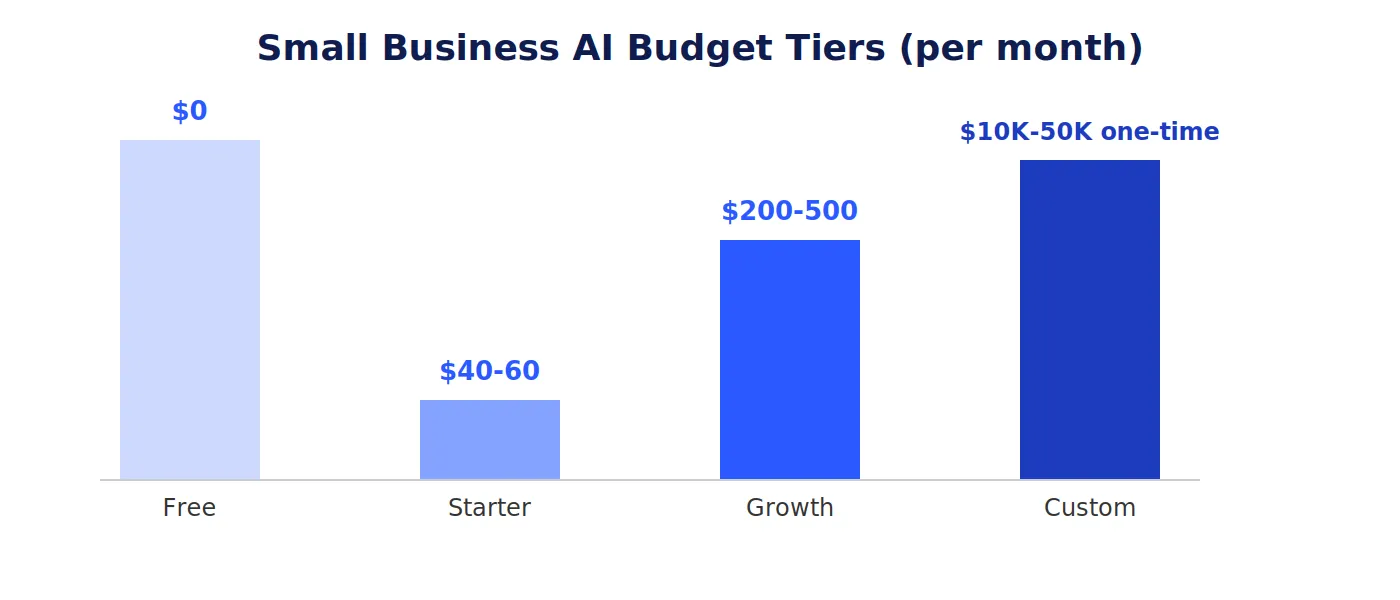
Most small businesses live in the $0 to $500 range. Custom builds are a separate, one-time investment.
The quick version: the floor is genuinely $0 thanks to capable free tiers, the comfortable middle is $40 to $500 a month, and custom agency builds are a separate $10,000 to $50,000 one-time investment that most small businesses do not need in year one. |
Why AI Budgets Are Smaller Than You Think in 2026
There is a reason these numbers feel low compared to the breathless headlines. Two things happened to AI pricing over the last two years, and both work in your favor.
First, prices dropped. Average AI software prices have fallen roughly 15 percent since 2024, mostly because there are now dozens of competitors fighting over your subscription. When ChatGPT, Claude, Gemini, and Perplexity all sit at around $20 a month with similar features, none of them can charge a premium for the basics.
Second, the free tiers got good. Really good. The free version of an AI assistant in 2026 is not the sad, crippled demo it used to be. It is a capable tool that handles a surprising amount of real small business work. That changes the entire budgeting conversation, because your floor is now genuinely zero, not "zero but useless."
Put those together and you get the cheapest year in history to start with AI. So when a vendor quotes you something that sounds enormous, you have a frame of reference to push back. Most small business problems get solved with off-the-shelf tools for $20 to $100 per user per month, not five-figure projects.
The $0 Budget: Yes, This Is Real Now
Let us start where you should actually start, which is by spending nothing. A solo founder or a small team can run for months on free tools alone, and for a lot of you this will be enough to prove the whole idea before you commit a dollar.
�� A working free stack • ChatGPT or Claude (free tier) for writing, brainstorming, research, summarizing documents, and answering quick questions. • HubSpot free CRM to track leads and contacts without paying until you outgrow it. • Mailchimp free for email marketing up to 500 contacts. • Google Search Console to understand how people find your website, at no cost. • A free chatbot tier like Tidio to auto-answer the handful of website questions you get each day. |
Will you hit limits? Eventually, yes. Free tools cap how much you can use them, slow down when traffic is high, and lock the better features behind a paywall. But that is exactly the point of starting here. You find out where your real needs are by bumping into the ceilings, and then you pay to remove the specific ceiling that is slowing you down. Spending money before you know what you need is the single most common way small businesses waste their AI budget.
Who the free budget is right for
The $0 stack fits solo founders, brand-new businesses, and anyone who is genuinely unsure whether AI fits their workflow. If you are in this group, do not let anyone rush you past it. A month on the free tier teaches you more about what you need than any sales call ever will.
The $50 to $100 Budget: The Starter Stack
This is where most small businesses should actually begin paying. One good AI assistant, plus a couple of cheap specialists, and you have a kit that pays for itself in the first week of every month.
Tool | What it does | Monthly cost |
ChatGPT Plus or Claude Pro | Writing, research, analysis, brainstorming | $20 |
Grammarly | Editing and proofreading | ~$12 |
Meeting transcription and summaries | ~$8 | |
Canva Pro | Fast, on-brand design | $13-$15 |
Total | Writing, editing, notes, and visuals covered | $40-$60 |
Here is the math that makes this a no-brainer. Survey data from 2026 found that small business employees save an average of 5.6 hours a week using AI tools, with managers reclaiming over 7 hours. Even at a modest $25 an hour, that one $20 assistant pays for itself in the first few hours of the month and prints time for the rest of it.
Run your own version of that calculation. If a tool gives one person back five hours a week, and that person's time is worth $30 an hour, that is roughly $600 of recovered value a month against a $20 cost. You do not need a finance degree to see why this tier is where the easy wins live.
Mini case study: a two-person marketing consultancy used the free tier of an AI assistant for one task, turning rough call notes into polished client recaps. That single change cut their post-meeting admin from about 40 minutes to 10. Across a month of calls, that was roughly 8 hours back, redirected to billable work. They did not pay a cent until month three, when free limits finally got in the way. |
The $200 to $500 Budget: The Growth Stack
Once you have proof that the basics work, this tier is where AI stops being a personal productivity trick and starts touching revenue. You are no longer just writing faster. You are automating processes and freeing your team to do the work that actually grows the business.
At this level you are layering in:
• Sales and marketing automation that follows up with leads, schedules content, and keeps your pipeline moving without manual nudging.
• A customer support chatbot that handles routine questions on its own, around the clock, so your team only touches the conversations that need a human.
• An AI-enhanced CRM so lead data, notes, and follow-ups stop getting copied by hand.
• A content engine that turns one blog post into social posts, an email, and a summary, multiplying your output several times over.
• Connector tools that link your apps so information flows between them automatically.
The tools themselves are still the cheap part at this tier. The real cost that owners forget is time. Budget 20 to 30 hours of internal setup and learning for every major tool you bring in. Nobody puts that line in a pricing calculator, but it is the difference between software that earns its keep and a $400-a-month pile of subscriptions nobody opens.
Not Sure Which Tier Fits Your Business? Brandrums maps AI stacks to real budgets and real goals, so you are not copying someone else's setup and hoping it works. |
What About Custom AI?
At some point a business outgrows off-the-shelf tools and wants something built around its own data: a chatbot trained on your products and policies, a recommendation engine, an automation that connects systems no single product talks to. That is custom territory.
Agency custom AI builds generally run $10,000 to $50,000 as a one-time project, depending on scope. That sounds like a lot next to a $20 subscription, but compare it to the alternative: an in-house AI specialist costs $80,000 to $180,000 a year plus overhead. For most small businesses, an agency project is the lower-risk way to get something custom without hiring a full-time team.
Here is the honest advice, though. Most small businesses do not need custom AI in year one. Jumping to a custom build before you have squeezed value out of the cheap, off-the-shelf stuff is a classic way to overspend. Custom means you are now in the software maintenance business whether you wanted to be or not. Models need retraining. Data pipelines need monitoring. Exhaust the pre-built tools first. When you genuinely hit their ceiling, that is the moment a custom build pays off, and not before.
The Hidden Costs Nobody Quotes You
The sticker price is never the whole price. The advertised monthly fee is often only 20 to 40 percent of your true first-year cost. Here are the line items that quietly inflate AI budgets, so you can plan for them now instead of being surprised later.

The advertised subscription is the tip. Budget for the rest before it surprises you.
• API usage charges. Some tools bill by the call or the token, so your cost grows with how much you use them. Great until it surprises you on a busy month.
• Integration. Connecting tools to each other can run $500 to $5,000 if you need help wiring them up properly.
• Training time. Budget 10 to 30 hours to learn each tool well enough to actually trust its output.
• Data cleanup. AI is only as good as the data you feed it. Messy CRM records and scattered files cost you on the back end, because the AI produces worse results from worse inputs.
• The productivity dip. Expect two to four weeks of slightly reduced output while your team adapts to a new tool. It is temporary, but it is real, and it belongs in your budget.
A Realistic 12-Month Budget Example
Let me put it all together for a typical small business with a handful of employees, growing into AI over a year.

Ramp up slowly. Pay for capability only once you have proven you need it.
Phase | What you are doing | Monthly AI spend |
Months 1-2 | Testing on free tiers, finding your real needs | $0 |
Months 3-5 | Starter stack: one assistant plus cheap specialists | $40-$60 |
Months 6-9 | Growth stack: automation, chatbot, CRM, content engine | $200-$400 |
Months 10-12 | Optimizing, cutting what is idle, scaling what works | $200-$500 |
Notice the shape of it. You ramp up slowly, you only pay for capability once you have proven you need it, and by the end of the year you have a setup that is fully justified by the time and revenue it produces. That is a healthy AI budget. The unhealthy version is signing up for six tools in month one and trying to figure out the value later.
The One Rule That Governs Every AI Budget
Whatever you spend, measure what it gives back. If a tool saves real hours or brings in real revenue, keep it and maybe spend more. If you cannot name what it has saved you within 60 days, cancel it.
This is the entire discipline. AI is not expensive when it is tied to outcomes. It gets expensive when it quietly becomes a stack of subscriptions you forgot you were paying for. A majority of AI users report saving $500 to $2,000 a month from their tools, but those results depend heavily on implementation quality, not just which logos you picked. The businesses that win are the ones that treat every tool as a bet that has to prove itself.
Before you add any AI tool, confirm ✓ It maps to one specific, repeated task you already do ✓ You can estimate the hours or dollars it should save ✓ You have budgeted setup and training time, not just the subscription ✓ You know how you will measure its impact within 60 days ✓ You are not duplicating something a tool you already pay for can do |
Want a Budget Built Around Your Business? Skip the trial and error. Brandrums builds AI setups around your goals and your budget, whether that is $50 a month or a custom project. |
Frequently Asked Questions
Frequently Asked Questions
How much should a small business budget for AI in 2026?
Most small businesses spend between $50 and $500 per month on AI tools in 2026. A bare-bones setup runs $30 to $50, while a full growth stack covering content, sales, support, and automation lands around $200 to $500. Custom AI builds from an agency are separate and typically run $10,000 to $50,000 as a one-time project.
Can a small business use AI for free?
Yes. In 2026 the free tiers of ChatGPT and Claude, HubSpot free CRM, Mailchimp free up to 500 contacts, and Google Search Console let a solo founder run a useful AI stack for months at no cost. Free tools cap usage and slow down at peak times, but they are a no-risk way to test whether AI fits your business before paying.
What are the hidden costs of AI tools?
The advertised subscription is often only 20 to 40 percent of the true first-year cost. Hidden costs include setup and training time (10 to 30 hours per tool), integration ($500 to $5,000 to connect tools), usage-based API charges that grow with volume, and data cleanup so the AI has good information to work with.
How do I know if an AI tool is worth the money?
Tie every tool to a measurable outcome. Calculate first-year cost (monthly fee times 12, plus setup and training hours) and divide by expected monthly savings to find your break-even. Under six months on an important task is a clear win. If you cannot name what a tool saved you within 60 days, cancel it.
Is custom AI worth it for a small business?
Usually not in year one. Most small business problems are solved with off-the-shelf tools for $20 to $100 per user per month. Custom AI makes sense once you have genuinely outgrown pre-built tools and have a specific process that no product on the market handles. At that point an agency build at $10,000 to $50,000 is lower-risk than hiring an in-house specialist.
About Brandrums Brandrums is a digital agency helping businesses grow with web design, app development, SEO, branding, and practical AI solutions. We build AI setups around real goals and real budgets, so you get tools and automation that actually earn their keep. Explore our AI solutions or talk to our team to get started. |
© 2026 Brandrums. All rights reserved. | brandrums.com
Key takeaways
A web application is software you open in a tab, not install. The line between that and a desktop app keeps blurring.
The best examples (Notion, Figma, Linear, Stripe) win on one or two specific things, not by piling features on.
For most builds, a focused first version in the $30k to $90k range beats a $250k everything-app that ships in a year.
Picking the right framework, hosting, and database matters less than picking the right scope.
Collage of recognisable web application logos and UIs including Notion, Figma, Stripe and Linear
What counts as a web application
If you can open it in Chrome and do real work, it is a web application. Email, dashboards, CRMs, design tools, accounting software, chat. The browser became the operating system for most office work years ago, and the gap between native apps and web apps keeps closing every release cycle.
The boring technical answer is that a web app runs in the browser, talks to a backend over HTTP, and stores data on a server you control. The interesting answer is that the format has eaten almost every category of business software. We design and build them through our website development and web application development teams, and the conversation almost never starts with technology. It starts with the workflow somebody is sick of doing in spreadsheets.
Eight popular web application interfaces side by side as a reference grid
Eight web app examples worth studying before you build

Looking at strong products is a faster way to learn than reading framework docs. Here are eight web apps you have probably used this week, and the specific thing each one gets right.
1. Notion
Notion turned the database into a building block. A page can be a doc, a kanban board, a wiki, or a CRM, depending on what you drop into it. The lesson is composability: instead of shipping ten rigid features, ship five primitives users can combine.
What to steal: let users assemble their own workflow on top of a small, well-designed set of pieces. This is what makes our work on scoping a startup app easier; you trade a long feature list for a few flexible building blocks.
2. Figma
Figma is the textbook example of multiplayer in the browser. Two designers can be in the same file from two continents and never overwrite each other. That is a hard engineering problem (CRDTs, presence, conflict resolution), and Figma made it the default expectation for design tools.
What to steal: if collaboration is core to the workflow, real-time presence is no longer a nice-to-have. Even an internal tool feels better when teammates can see each other typing. Pair this thinking with our web design approach and you get a product that handles teamwork without an extra Slack message.
3. Slack
Slack works because it sits next to the work, not on top of it. Integrations turn it into the front door for everything (deploys, alerts, support tickets, calendar). The web version is the canonical Slack experience; the desktop app is just a wrapper.
What to steal: a web app that connects cleanly to the other tools your customer already pays for has a real advantage. We see this pattern repeatedly in our ecommerce solutions work, where the storefront is only useful when it talks to payments, fulfillment, and marketing in real time.
4. Linear
Linear is opinionated. There is one good way to track work, and the app pushes you toward it. Keyboard shortcuts everywhere. Local-first feel even though it is a web app. No legacy settings panel from 2014.
What to steal: speed is a feature. If the page renders in under 100ms and every action is keyboard-reachable, your users will tolerate fewer features. They will also stop comparing you to whatever clunky enterprise tool they were forced to use before. The same principle drives the work we describe in our MVP vs full product guide.
5. Stripe Dashboard
Stripe handles a punishing amount of complexity (multi-currency, disputes, payouts, tax, fraud) and still feels approachable. The dashboard surfaces what an operator needs today and hides the rest behind one extra click.
What to steal: data-heavy products do not have to look scary. A clear hierarchy, sensible defaults, and progressive disclosure go further than three more columns in the table. This shows up in every dashboard we ship for fintech clients.
6. Shopify Admin
Shopify is a web app that hands a non-technical merchant the operational complexity of a small enterprise (products, orders, inventory, shipping, payments, marketing, apps) without making them learn anything that is not directly relevant. The marketplace ecosystem extends the platform without bloating the core.
What to steal: composability through a plugin model lets your product grow without your team having to build every feature. We see this constantly in our ecommerce industry work.
7. Loom
Loom replaced a meeting category. Instead of "can we get on a call", you record a 90-second video. The browser captures your screen, your camera, and uploads while you talk. By the time you hit stop, the link is already in your clipboard.
What to steal: removing one step of friction can change a behaviour. If your app saves a user 60 seconds in a workflow they repeat 30 times a day, that is the only justification you need to build it.
8. Airtable
Airtable looks like a spreadsheet and behaves like a relational database. Non-technical people build entire operations inside it. Sales pipelines, content calendars, inventory systems, applicant tracking.
What to steal: starting from a familiar interface (spreadsheets) lowers the activation hill dramatically. New users do not need a tutorial. They just need a column to type into. This is gold when the buyer is not a developer.
Web applications versus desktop and native software
Most categories that used to live on desktop are now web-first by default. The trade-offs are smaller than they used to be, and the upside of shipping in a browser is substantial. We push almost every project here unless there is a hard reason to go native (offline-first, high-performance graphics, deep OS integration).
Area | Traditional software | Modern web application |
|---|---|---|
Distribution | Installer, update cycle, OS support matrix | Send a URL |
Updates | Manual, often skipped by users | Push to production, everyone sees it |
Collaboration | Bolt-on, usually weak | Real-time by default |
Cross-device | Separate builds per OS | Same codebase across desktop, tablet, phone |
Hardware access | Full | Improving fast (WebRTC, WebGPU, WebUSB) |
Offline | Native strength | Possible with service workers, harder to nail |
Bar chart comparing web app build cost ranges across four scope tiers
What a web app actually costs to build in 2026
The honest answer is "it depends", but the ranges are not as wide as agencies make them sound. The number that matters is scope, not technology. Two builds with the same stack can be 5x apart on cost depending on how many user roles, integrations, and edge cases the team chose to handle.
Type of web app | Build range | Typical timeline |
|---|---|---|
Marketing site with a few interactive tools | $8,000 to $25,000 | 4 to 8 weeks |
Customer portal, simple SaaS MVP | $30,000 to $80,000 | 2 to 5 months |
Mid-complexity SaaS with auth, billing, admin | $80,000 to $180,000 | 5 to 9 months |
Multi-tenant SaaS with integrations and reporting | $180,000 to $400,000+ | 9 to 18 months |
For a real-world breakdown of US market pricing, see our piece on affordable custom website development services in the USA. If the build leans heavily on a mobile companion app, the cost ranges in mobile app design cost apply on top.
Vertical slice diagram showing one workflow shipped end to end instead of many half built features
How to scope your first version without overbuilding
Most web app projects fail at scope, not at code. The team builds eight features when two would have told them the same thing. The fix is uncomfortable but simple: pick one workflow, ship a usable version of it, watch what real users do, then decide what comes next.
A useful checklist before any kickoff:
Write down the one thing a user should be able to do in version one.
List every feature you think you need. Cut anything that is not on the path to that one thing.
Decide what "good enough" looks like for performance, security, and design. Be specific.
Identify the one integration that would be a deal-breaker if it broke. Build that one well.
Plan how you will see what users actually do once it ships (analytics, session replay, support inbox).
This is the same logic we apply on mobile application projects. Build the first vertical slice end-to-end. Resist the urge to spread thin across many half-built features.
Where AI fits inside a web application
Almost every web app we ship in 2026 has an AI feature in it somewhere. The good ones are quiet. A search box that understands intent. A draft email that fills itself in. A support tool that triages tickets before a human sees them. The AI is a layer, not the whole product.
The frontier models keep shifting. We covered the latest in our Claude Opus 4.8 deep dive, and the practical takeaway is that you no longer need a dedicated machine learning team to ship a useful AI feature. You need a clean API call, a thoughtful prompt, and a UI that handles streaming responses gracefully. Our AI development practice covers the rest (RAG over your own data, agent loops, evals).
Where this lands by industry
The pattern is similar across verticals but the priorities differ. A few we work in:
Fintech needs audit trails, two-factor everywhere, and dashboards that survive scrutiny.
Healthcare needs privacy by design, role-based access, and integrations with EHR systems.
Education needs accessibility, multi-tenant scoping (school, class, student), and content that performs on weak networks.
Real estate needs maps, scheduling, and lightweight CRM in one place.
How Brandrums helps you ship one
The job is not picking a framework. It is choosing a scope you can ship, validating it with real users, then deciding what to add. We start every web app engagement by mapping the actual workflow the product needs to support, then propose the smallest version that proves the model. After that the team moves into design, build, deploy, and the ongoing measurement work that turns a launch into a product.
You can see how this looks in our project portfolio. If you want pricing context, our pricing page walks through typical engagement shapes. If you would rather skip ahead and talk, our team usually responds within a business day.
Key takeaways
Every web app worth copying wins on one specific thing. Pick what you want to be remembered for.
Scope kills more projects than tech does. Ship the smallest version of one workflow.
Real-time collaboration, fast performance, and clear data hierarchy are the table stakes most teams still miss.
AI features should feel quiet and useful, not bolted on for the headline.
Cost ranges from $30k to $400k+ depending on scope. The right tier is whatever lets you launch and learn fastest.
FAQ
What is a web application in plain language?
Software you open in a browser tab to do real work. CRMs, dashboards, design tools, accounting tools, internal portals. If you can use it without installing anything beyond Chrome or Safari, it is a web application.
How is a web app different from a website?
A website mostly shows content. A web application changes state. You log in, create things, edit them, collaborate with others, and your changes persist. The line is fuzzy at the edges, but the simple test is whether users come to read or to do.
How long does it take to build a web application?
A focused MVP usually ships in 2 to 5 months. A mid-complexity SaaS with auth, billing, and an admin panel runs 5 to 9 months. Multi-tenant platforms with deep integrations can run a year or more. Scope is the main variable.
Do I need a mobile app if I have a strong web app?
Sometimes. If your users live in your product while at a desk, a great responsive web app is usually enough. If they interact in short, frequent bursts while away from a desk (delivery, field service, on the go), a native or cross-platform mobile app earns its keep.
Which web app stack is best in 2026?
The honest answer is that the stack matters less than your team. Most production web apps we ship use TypeScript, React, Next.js, Postgres, and a managed hosting layer. The boring stack with a strong team will beat an exotic stack with a weak one every time.
Ready to scope your web application?
If you have a workflow that is held together with spreadsheets, calls, and screenshots, that is usually the right starting point for a web app. We will help you draw the smallest version that proves the value. Tell us what you are trying to build, or look through our pricing tiers if you want a sense of cost before the call.
Tags
About the Author

Daniel Brooks
Daniel covers web development, artificial intelligence, product design, and the technology decisions that help modern businesses grow.