
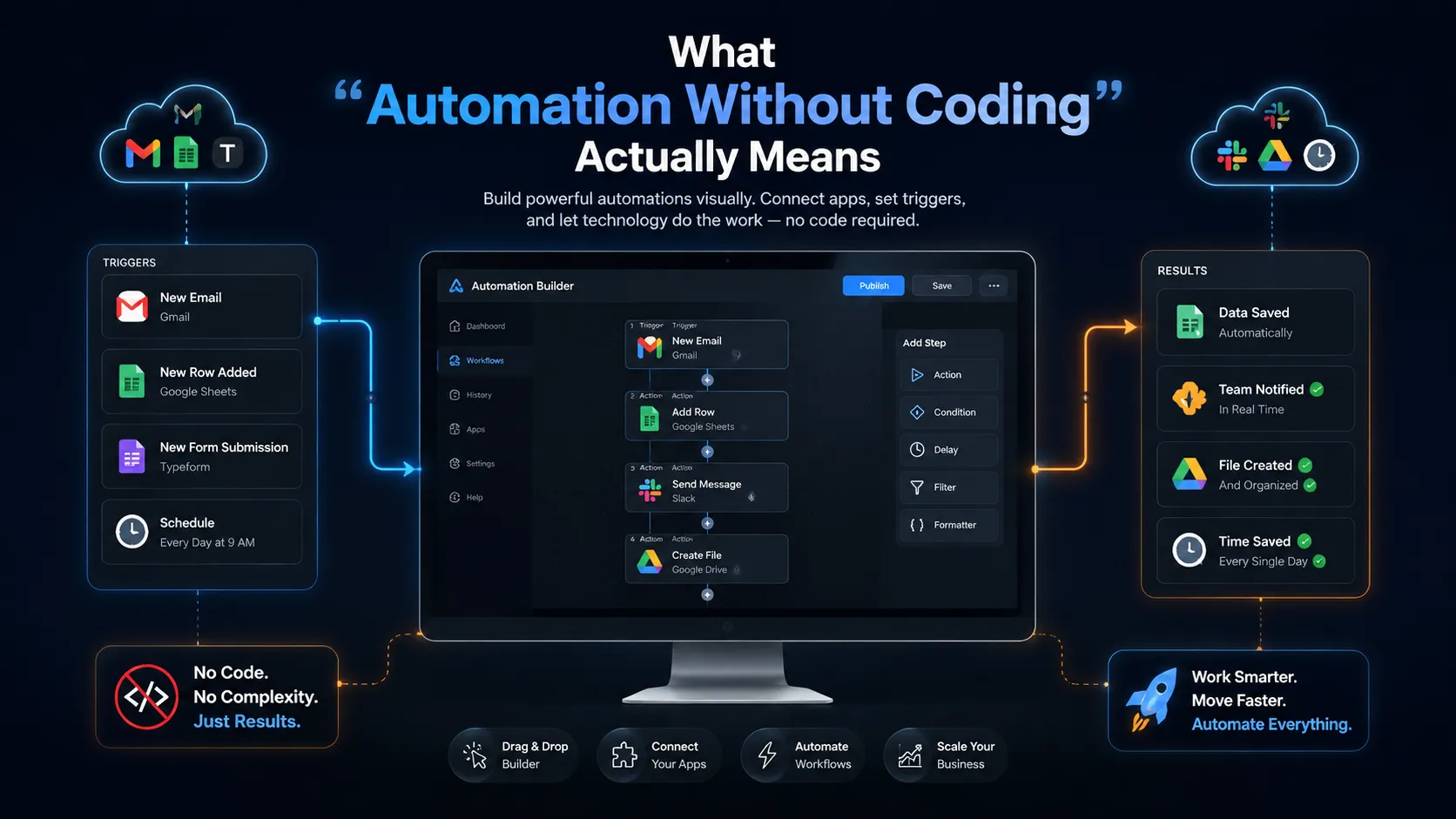
What "Automation Without Coding" Actually Means
For years, "automate your business with AI" came with an invisible asterisk: or hire someone who can code, or pay an agency a fortune. That asterisk is mostly gone. In 2026, a non-technical business owner can build real, working AI automations by connecting tools that already know how to talk to each other, no programming required. Let us be precise about what this means, because the phrase gets thrown around loosely. No-code automation is software that lets you set up an "if this happens, then do that" rule using a visual interface, dropdowns, and plain language instead of code. You are not writing instructions in a programming language. You are clicking through a setup screen the way you would configure an out-of-office reply.
hero image for this blog, top of post, full width
Every no-code automation is this same shape: something happens, AI acts, a result lands. No coding involved. Every automation, no matter how fancy it looks, follows that same shape. Something happens (a trigger), the AI does something with it (an action), and you get a result. A form gets submitted, AI summarizes and categorizes it, and the summary lands in your inbox already sorted. Once you see that pattern, the whole category stops feeling intimidating.
Why This Is Suddenly Possible
Two things converged to make no-code AI automation real for ordinary businesses. First, automation platforms added AI steps you can drop into a workflow without configuring anything technical. Second, the AI itself got good enough to handle messy, human inputs reliably, so a summarize or categorize step actually works instead of producing nonsense. The result shows up directly in the time-savings data. Small business employees save an average of 5.6 hours a week with AI tools, and managers reclaim more than 7. A large share of that reclaimed time comes from exactly the repetitive, rule-based tasks that no-code automation handles.
Most of those reclaimed hours come from the exact repetitive tasks no-code tools automate. In other words, this is not a niche trick for the technically curious. It is one of the most direct ways a small team gets hours back every week without hiring anyone or learning to program. It is worth being clear about why this was hard until recently, because it explains why so many owners still assume they cannot do it. A few years ago, connecting two business apps meant either paying for a custom integration or accepting that someone would copy data by hand forever. The AI step in the middle, the part that reads a messy message and decides what to do with it, simply was not reliable enough to trust. Both of those barriers fell at once. The connector platforms matured into genuinely friendly visual tools, and the AI got good enough that a "summarize this and tag it" step produces something you can actually use. The window where this is possible for non-technical owners only opened recently, which is exactly why moving on it now is an advantage rather than a catch-up.
The Tools That Make It Work
You do not need many. A connector platform plus a general AI assistant covers most of what a small business will want to automate.
Tool type | What it does | Rough cost |
|---|---|---|
Connector platform (Zapier, Make) | Links your apps and triggers actions between them | $0-$30/mo to start |
AI assistant (ChatGPT, Claude) | The "brain" step: summarize, classify, draft, extract | $0-$20/mo |
Chatbot builder (Tidio and similar) | Automates website and support conversations | $0-$30/mo |
Your existing apps | Email, forms, CRM, sheets you already use | Already paying |
Five Automations You Can Build First
Here are concrete, high-value automations a non-technical owner can set up, roughly in order of how easy they are to start.
Auto-sort and summarize incoming leads When someone fills out your contact form, AI summarizes their message, tags it by type or urgency, and drops it into your CRM or inbox already organized. No more manually reading and sorting every inquiry.
Turn meetings into action items A transcriber records the call, AI pulls out decisions and to-dos, and the summary gets sent to everyone automatically. The note-taking job disappears.
Answer repetitive customer questions A chatbot handles your hours, pricing, shipping, and returns questions around the clock, escalating only the ones that need a human. This saves time every single day.
Repurpose one piece of content into many Publish a blog post and an automation drafts the social posts, an email version, and a summary from it, multiplying your output without multiplying your effort.
Auto-draft routine replies For common email types, AI prepares a draft reply you just review and send, cutting response time without losing the human check.
Mini case study: a small services business connected its website form to an AI step and its CRM. Every new lead now arrives summarized in one or two lines, tagged by service type, and slotted into the right pipeline stage automatically. The owner estimated it removed about 30 minutes of manual sorting a day, roughly two and a half hours a week, built in an afternoon with zero code.
How to Build Your First One
The process is the same every time, and it is genuinely approachable.
Pick one repetitive task. Something you do the same way over and over. Start small and obvious.
Identify the trigger. What event kicks it off? A new email, a form submission, a calendar entry.
Choose the AI action. What should happen? Summarize, categorize, draft, extract, route.
Set the result. Where does the output go? An inbox, a sheet, a CRM, a chat channel.
Test it a few times. Run real examples through it and adjust until you trust it.
That is the entire skill. Pick, trigger, action, result, test. The visual builders walk you through each step with dropdowns and plain-language prompts. Your first automation might take an afternoon. Your fifth will take fifteen minutes. A quick worked example makes it concrete. Suppose the repetitive task is handling contact-form inquiries. The trigger is "a new form entry arrives." The AI action is "read the message, summarize it in one line, and label it as a sales question, a support question, or spam." The result is "post the labeled summary into the right channel and add the contact to the CRM." You set each of those in a dropdown, type the instruction for the AI step in plain English, and run a few real inquiries through to confirm it labels them correctly. Once it does, you switch it on and it quietly handles every inquiry from then on. The first time you watch it sort a lead without you touching anything, the whole category clicks, and you start seeing candidates for automation everywhere you look.
What to Watch Out For
No-code does not mean no judgment. A few honest cautions so your automations help instead of quietly causing problems. Keep automations safe and useful
Keep a human in the loop for anything customer-facing. Have AI draft, but review before sending where the stakes are real.
Test with real data before going live. An automation that mis-sorts every lead is worse than no automation.
Watch usage-based costs. Some platforms charge per task or per run, so a high-volume automation can cost more than expected.
Start with low-risk tasks. Automate internal admin before you automate anything that touches a customer or money.
Document what each automation does. Six months later you will not remember why it exists or what it touches.
None of these are reasons to avoid automation. They are just the difference between automation that saves you time and automation that creates a new mess to clean up. Respect the guardrails and the upside is enormous.
Where This Leads
Start with one automation and a pattern emerges fast. You begin seeing repetitive tasks everywhere, and each one becomes a candidate. A business that automates its busywork piece by piece ends up with a small team that performs like a much larger one, because nobody is spending their day copying data between apps or sorting the same inbox by hand. That is the real promise of no-code AI automation. Not robots running your company, but your existing people freed from the repetitive work so they can focus on the parts of the business that actually need a human. And you get there without writing a single line of code or hiring anyone to do it for you.
Frequently Asked Questions
Can I automate my business with AI without coding?
Yes. No-code automation platforms like Zapier and Make let you connect your apps and add AI steps using a visual interface, dropdowns, and plain language instead of programming. You set up an 'if this happens, then do that' rule, such as summarizing and sorting every new lead automatically. Most small business automations can be built in an afternoon.
What can AI automation do without coding?
Common no-code AI automations include auto-sorting and summarizing leads, turning meeting recordings into action items, answering repetitive customer questions with a chatbot, repurposing one blog post into social posts and emails, and auto-drafting routine email replies. Anything repetitive and rule-based is a candidate.
What tools do I need for no-code AI automation?
Usually just two: a connector platform like Zapier or Make ($0 to $30 a month to start) that links your apps, and a general AI assistant like ChatGPT or Claude ($0 to $20 a month) that acts as the brain step. Many automations simply connect tools you already pay for, so they cost nothing extra.
Is no-code AI automation reliable?
It is reliable when set up carefully. Test every automation with real data before going live, keep a human reviewing anything customer-facing, and start with low-risk internal tasks before automating anything that touches a customer or money. Built with those guardrails, no-code automations run consistently.
How much time can AI automation save?
Small business employees save an average of 5.6 hours a week with AI tools, and managers reclaim more than 7. A large share of that comes from the repetitive, rule-based tasks that no-code automation handles, like sorting leads, taking notes, and answering common questions.
Ready to build the AI setup that fits your business?
Whether you are a solo founder testing the waters or a growing team scaling into serious automation, we help clients pick the lightest AI stack that earns its keep. Same discipline we apply through website development, web application development, SaaS development, and digital marketing retainers. Tell us what you are trying to automate and we will recommend a setup. Or check our pricing options if you are scoping engineering support alongside the tooling.
Tags
About the Author

Daniel Brooks
Daniel covers web development, artificial intelligence, product design, and the technology decisions that help modern businesses grow.